- CCM Design Insights
- Posts
- Headings for academics: 3 fields idea
Headings for academics: 3 fields idea
After working with researchers for years, I've discovered some exciting things about the optimal size of document headings.
What's the first thing that catches your eye when you see a newspaper article or an academic paper? I'm pretty sure you answered "the title," didn't you?
According to Attention Marketing (a strategy that aims to capture the consumer's attention), your text has 8 seconds to capture a person's attention.
We can apply this idea to any text in marketing and other fields, such as websites and academic publications. After all, titles and headings are the first contact points between the reader and your content, so you must do everything possible to captivate them.
So, you need to know the best ways to optimize your content, focusing on the presentation details of your titles and headings. And this is where the design will make all the difference.
Knowing this and after working with researchers for years, I've discovered some exciting things about the optimal size of document headings. Let me share them with you.
How long heading should be
In the beginning, these long and complex titles of academic papers made me cringe. Every design I made looked good with a normal-sized header, but things got messy when we got the real thing: a four-line-long article title. Challenge Accepted!
The structure I'm about to introduce you to is not entirely new but inspired by a field older than the design itself: journalism.
The construction of a journalistic text is not separate from the creativity of those who write it, but there is a pattern to follow in building headlines.
If you like news, you've noticed a fixed structure in journalistic headlines: it is made up of a pre-title (let's call it a brow), headline, and subheading. Generally, we have the brow highlighted in one or two words; the main title is one to two lines long in H1, followed by the subheading, often up to two lines long.
Pre-title: It generally works as extra information or a refinement of the content
Headline: Always in a larger font size, it captures the reader's interest, delimits, and summarizes the news. Generally speaking, it is the news.
Subheading: It works as a summary or summary of the news, with the most relevant aspects of the event.
In practice, this structure looks like this:
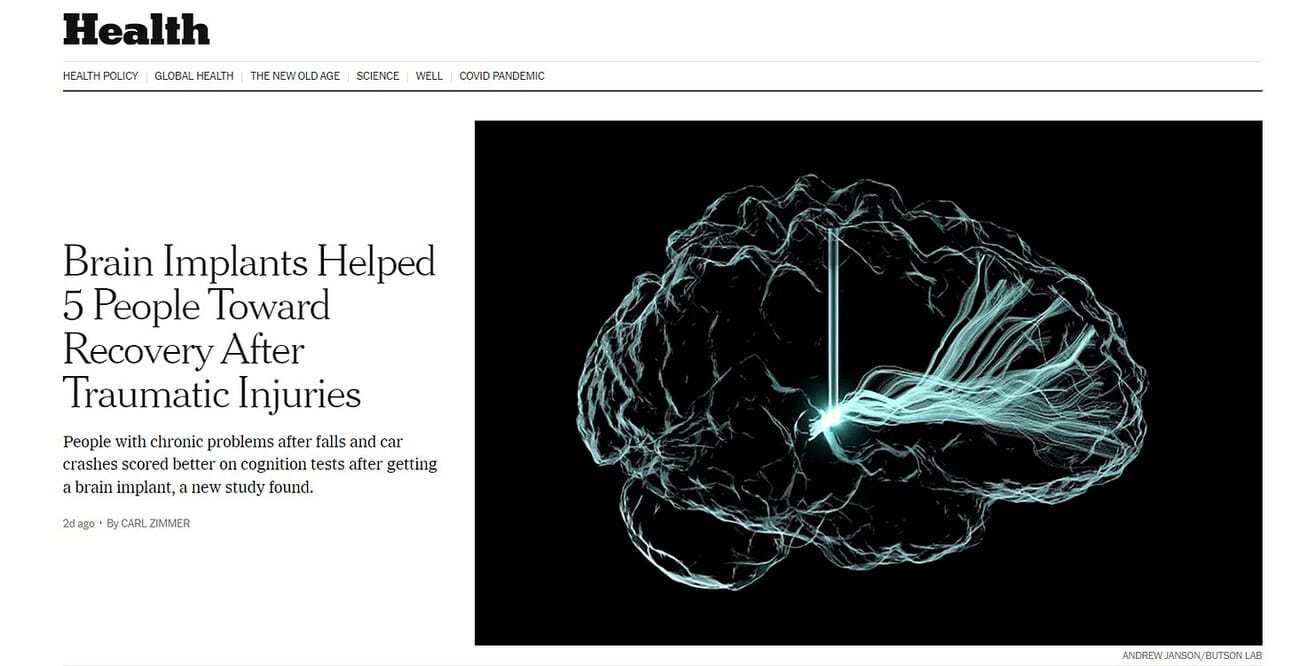
Do you realize that this way, we have a better organization of the content, clearly understanding what the story is about even though we have a lot of words?
Here is a possible solution for a 4 long-line academic article title. Doesn't that sound wonderful? Come, and I'll show you how it's possible.
How might we make a four-line long title look good
How might we make a four-line long title look good on a website or a publication? The first step is to find the correct length for your main heading.
Academics naturally need to explain complex things, and in many situations, this requires a fair number of words. On the other hand, designers aim to simplify things, making them more visually appealing and easy to read.
However, it is possible to combine these two goals by defining structure. After analyzing academic headings, I discovered a pattern:
Introduction + Main Title + Secondary Information
By breaking down the headings into these three categories, we can transform a visually tiring heading into something eye-catching and easy to scan.
Now, I use this structure for all my headlines, resulting in a well-planned typographic hierarchy that easily guides readers through the text.
Applying these three fields in a heading
I've provided three examples to help you understand how to create an effective header to capture a reader's attention. The first is usually how an academic sees long titles:

Notice that we have an extensive text, which is even uncomfortable to read. As our eyes have to move more from the end of one line to the beginning of the next, it's harder to keep up and stay engaged.
Take a look at this second example:

Here, we can see the headline organized with the fields I've identified, also following the journalistic structure: brow (pre-title or intro), main title, and secondary information. Notice how the brow introduces the information about the new tools; the main title indicates the subject of the publication in just two lines, and the secondary information specifies what we will find in the content.
This structure, with shorter lines and pleasing proportions, makes reading all the content more comfortable.
Now, following this model, let's see how I would organize the first example:

Much better, right? This structure ensures that we have all the content we need. In addition to dividing the header into these three fields, the changes in size, weight, and color are ways of creating an attractive layout with a well-planned hierarchical system.
Conclusion
Do you see how a simple structure, inspired by something as present in our daily lives as the news, can change how the header of academic content is presented?
It's amazing how a simple structure, inspired by something as common as the news, can transform academic publications.
I understand that, as an academic, it can be challenging to convey all the information in an article with a short headline. Still, once you can break long lines into different but complementary fields, your publication will have a better chance of reaching a broader audience.
By using this structure, your content becomes accessible and scannable, competing with the multitude of articles on the web. And designers, well, besides creating an effective structure for the layout, will love you forever.